

How it works
LeadLx CRM is LeadLx's own record of your team's accounts: the companies you work, the people at each one, their likely role in the decision, how well each company fits your ideal customer profile, and what is happening there. It works on its own. You don't need HubSpot to use LeadLx.
Connecting HubSpot does two things:
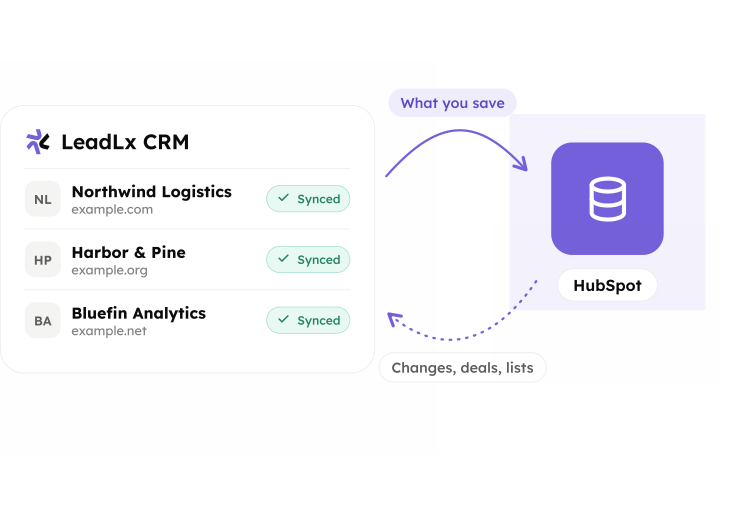
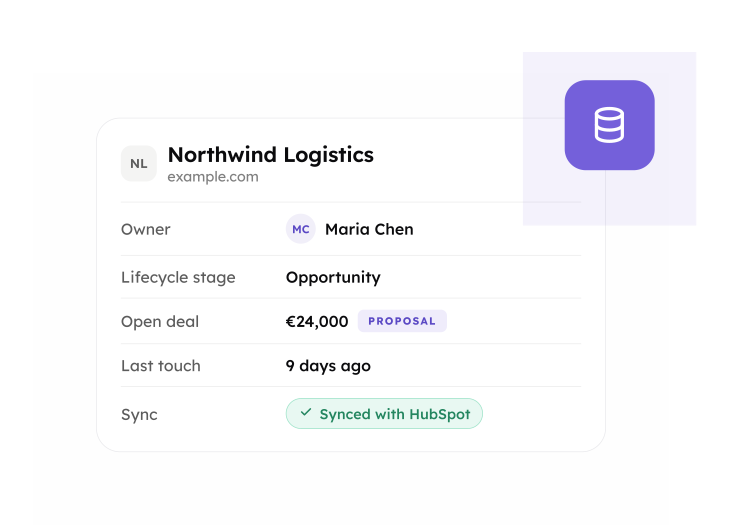
- Brings HubSpot into LeadLx. Your HubSpot contacts, companies, deals, lists and owners are read into LeadLx, so your reps see who owns an account and what deals are open next to their own research. This keeps up with HubSpot on its own.
- Sends what you choose to HubSpot. Only the contacts and companies saved in LeadLx go to HubSpot. You decide what is saved, so you decide what HubSpot receives.
Nothing reaches HubSpot until someone on your team saves it in LeadLx. Viewing a profile or generating a buying group sends nothing.
Connect HubSpot
You need: a HubSpot user with Super Admin or App Marketplace Access permission, and a LeadLx account. The Free plan works. Field mapping needs Pro, which comes with a 14-day free trial.
You can start from either side.
From the HubSpot App Marketplace
- Open the LeadLx listing and click Install.
- Choose your HubSpot account, review the permissions, and click Connect app.
- HubSpot sends you to LeadLx. Sign in, or create an account. The two accounts are linked and the first sync starts.
From LeadLx
- Sign in at app.leadlx.com.
- On the home page, click Connect HubSpot.
- Choose your HubSpot account, review the permissions, and click Connect app. You come back to LeadLx with HubSpot connected.
Once the accounts are linked, LeadLx reads your HubSpot records, and sends HubSpot the contacts and companies your team has already saved in LeadLx. Before it creates anything in HubSpot, it checks for a record that already exists. A HubSpot account can be connected to one LeadLx account at a time.

Choose what goes to HubSpot
A contact or company goes to HubSpot when you save it in LeadLx:
- One record. Open a contact or company and save it.
- A company and its buying group. Review the people LeadLx suggests, remove anyone you don't want, then save. The company and the people you kept are saved together.
- Records saved before you connected HubSpot. They are sent when you connect.

Once a record is in HubSpot, the changes you save to it in LeadLx are sent as well. To send records again, for example after you change your field mapping, select them in LeadLx CRM, or send everything that matches a filter, up to 10,000 records at a time.
What syncs, and when
| What | Direction | When |
|---|---|---|
| Contacts and companies you save in LeadLx | LeadLx to HubSpot | Shortly after you save |
| Contacts and companies in HubSpot | HubSpot to LeadLx | Within a few minutes of a change |
| Deals and owners | HubSpot to LeadLx | Within a few minutes of a change |
| Lists and their members | HubSpot to LeadLx | About every five minutes |
A full check runs about every four hours and catches anything missed.
If a field changes in both places
HubSpot keeps the final word. When a field is changed in HubSpot, LeadLx keeps the HubSpot value.
Duplicates
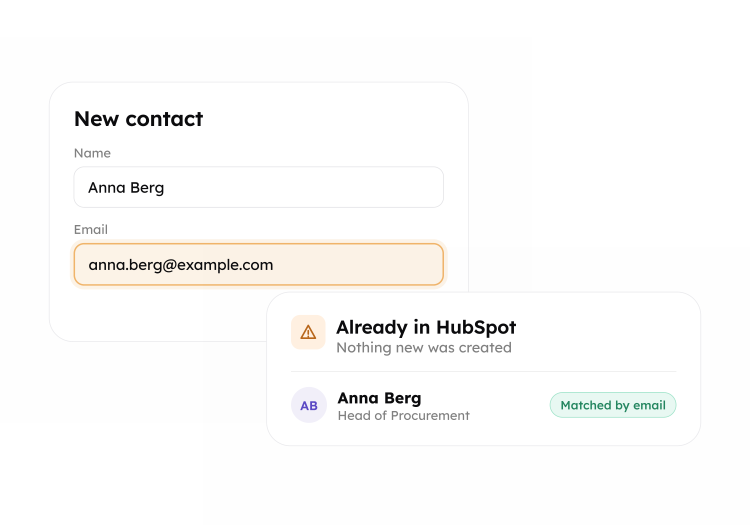
Before LeadLx creates a contact or company in HubSpot, it looks for one that already exists, for example by email for contacts and by domain for companies. If it finds a match, it shows a duplicate warning instead of creating a second record.
Deletes
Deleting a record in HubSpot removes it from the HubSpot view in LeadLx. LeadLx does not delete records in HubSpot.
Map your fields
LeadLx starts with a default mapping to the standard HubSpot properties. It also creates a LeadLx Intelligence property group in HubSpot for its own fields: ICP match, buying committee, intent signals and buying role.
To change the mapping (Pro plan):
- In LeadLx, open CRM mapping.
- For each LeadLx field, choose the HubSpot property it writes to. Your custom properties are in the list too.
- Save.
A new mapping applies to the next records you send. To update records already in HubSpot, send them again.

LeadLx in HubSpot
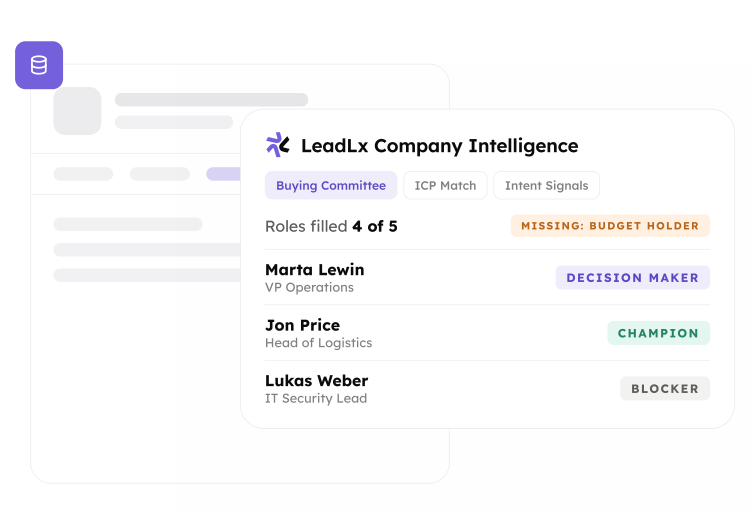
Open a company in HubSpot and select the LeadLx tab. The LeadLx Company Intelligence card shows the company's buying committee, ICP match and intent signals.
The same values are saved as properties in the LeadLx Intelligence group on companies and contacts, so you can use them in views, reports and workflows.
Disconnect
In HubSpot, go to Settings > Integrations > Connected Apps, find LeadLx, and choose Uninstall. Sync stops at once.
To disconnect from the LeadLx side instead, write to support@leadlx.com.
Your data
| Data | After you disconnect |
|---|---|
| The copy of your HubSpot records that LeadLx keeps | Kept for 32 days in case you reconnect, then deleted |
| Records your team saved in LeadLx CRM | Stay in your LeadLx account until you delete them. You can export them to CSV |
| Records and property values sent to HubSpot | Stay in HubSpot. They are your data |
| The LeadLx card on company records | Removed with the app |
LeadLx connects through HubSpot's own sign-in (OAuth), so it never sees your HubSpot password. Data is encrypted in transit. See our privacy policy.
Permissions
When you connect, HubSpot asks you to allow LeadLx to:
| Permission | Why |
|---|---|
| Read and write contacts | Read your contacts into LeadLx and send the ones you save |
| Read and write companies | Read your companies into LeadLx and send the ones you save |
| Read deals | Show an account's deals in LeadLx |
| Read owners | Show who owns a record |
| Read lists | Show your lists and their members in LeadLx |
| Read contact, company and deal properties | List your properties for field mapping |
| Create contact and company properties | Add the LeadLx Intelligence property group |
Help
| You see | What to do |
|---|---|
| HubSpot is installed, but nothing has synced | Finish setup: sign in to LeadLx from the page HubSpot opened. Sync waits until both accounts are linked |
| Reconnect HubSpot in LeadLx | HubSpot's access ended. Click it and approve again |
| A duplicate warning | The record is already in HubSpot. Open the existing record there |
| This HubSpot account is already connected | It is linked to another LeadLx account. Disconnect it there first |
| A field doesn't update in HubSpot | Check CRM mapping. Only mapped fields are sent |
Anything else: write to support@leadlx.com.